Detecting Network Intrusions with Snort in My Home Lab

Introduction
In this project, I built a practical Intrusion Detection System (IDS) lab using Snort, an open-source Network Intrusion Detection System widely used by security analysts. The lab environment included an Ubuntu VM running Snort, a Kali Linux VM acting as the attacker machine, and a Metasploitable 2 VM as the intentionally vulnerable target. The goal of this project was to simulate basic attacks such as ICMP pings and Nmap SYN scans, detect them using custom Snort rules, and document the alerts for portfolio demonstration.
Lab Topology & Overview
The virtual lab was set up on an isolated internal/host-only network
to ensure all testing remained safely contained. The environment
consisted of:
• Ubuntu (Snort IDS) — Used to install and run Snort, monitor
traffic, and store alert logs.
• Kali Linux — Used as the attacker machine to generate pings, port
scans, and reconnaissance traffic.
• Metasploitable 2 — Served
as the vulnerable target for testing detection capabilities.
All systems communicated over the same internal subnet
(e.g., 192.168.112.0/24), ensuring a safe and controlled testing
environment with no external exposure.
Tools Used
- Ubuntu (Snort)
- Kali Linux
-
Metasploitable 2
- Wireshark
- Nmap
Setup & Key Configuration
I began by verifying network connectivity between all VMs using
simple ICMP pings. This ensured each system could communicate with
the others over the isolated network segment.
Next, I installed Snort on the Ubuntu machine. During configuration,
I set HOME_NET to match my internal lab subnet, allowing Snort to
correctly classify traffic originating from within the environment.
I then created custom detection rules inside:
- Custom rules saved to /etc/snort/rules/local.rules
-
Example rules used in this lab are included below. These rules
defined the specific network activity I wanted Snort to alert on.
Snort Rules Used
ICMP Ping detection:
alert icmp any any -> $HOME_NET any (msg:"ICMP Ping Detected";
sid:100001; rev:1;)
This rule triggers when any external system sends an ICMP echo
request into the internal network.
Nmap SYN scan
detection:
alert tcp any any -> $HOME_NET any (msg:"NMAP SYN scan detected";
flags:S; sid:1000001; rev:1;) This rule triggers when a TCP packet
with the SYN flag set is sent
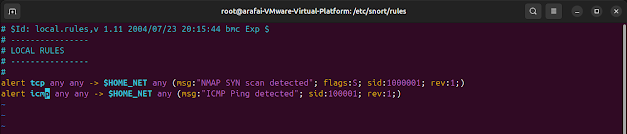 This rule identifies half-open SYN scans, a common reconnaissance
technique used by Nmap.
This rule identifies half-open SYN scans, a common reconnaissance
technique used by Nmap.
Running Snort and Testing
To begin monitoring, I launched Snort in console alert mode on the
correct network interface:
sudo snort -A console -q -c /etc/snort/snort.conf -i ens33
From Kali, test detection:
• ICMP ping:
ping -c 3 < target-ip >
• Nmap SYN scan:
sudo nmap -sS -sV -A < target-ip >
 As the attacks ran, Snort immediately displayed alerts in real time
on the Ubuntu console. These same alerts also appeared inside the
/var/log/snort/alert file for further analysis.
As the attacks ran, Snort immediately displayed alerts in real time
on the Ubuntu console. These same alerts also appeared inside the
/var/log/snort/alert file for further analysis.
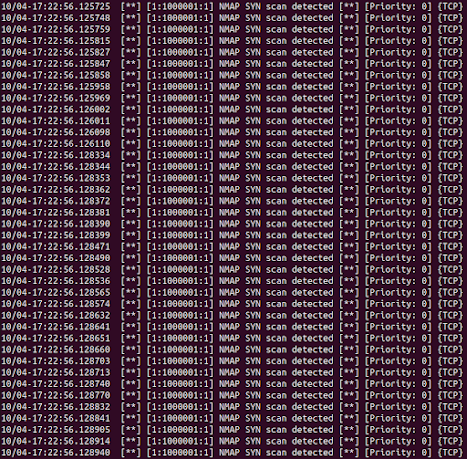
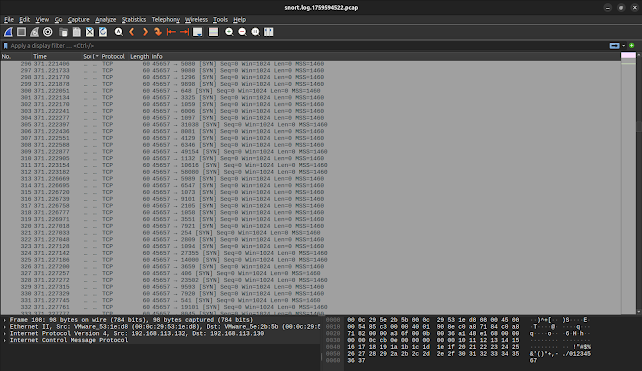
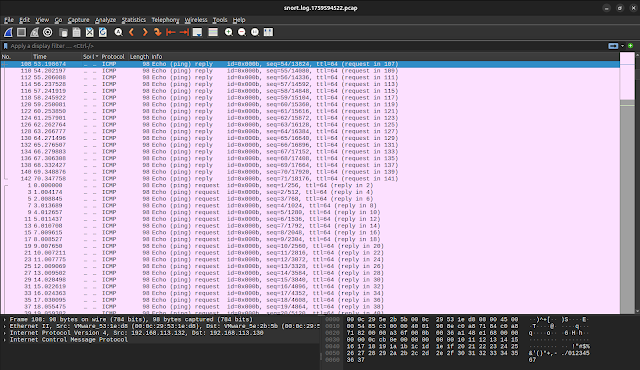
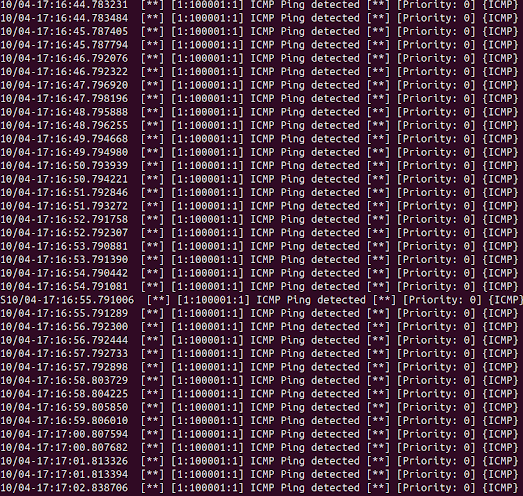 To view the raw packets, I captured the traffic using Wireshark,
which allowed me to visually confirm the ICMP and SYN packets
generated during the test scenarios.
To view the raw packets, I captured the traffic using Wireshark,
which allowed me to visually confirm the ICMP and SYN packets
generated during the test scenarios.
Results & Observations
During testing, Snort reliably detected both ICMP pings and Nmap SYN
scan attempts using the custom rules I created. This confirmed the
IDS was correctly configured and monitoring the intended network.
I learned that Snort rule syntax is very strict, even minor mistakes
such as missing spaces or incorrect separators will cause rule
errors. To avoid this, it is best practice to always validate the
configuration using:
sudo snort -c /etc/snort/snort.conf
-T
Additionally, while console alerts are useful for demonstrations,
they can become noisy in real-world environments. Production
deployments typically use thresholding or detection_filters to
reduce alert fatigue and improve signal-to-noise ratio.
Finally, maintaining an isolated virtual lab is essential. Keeping
Metasploitable 2 and attack traffic inside a host-only network
prevents accidental exposure and ensures a safe testing environment.
Key Takeaways
1. I learned how to properly configure Snort and set HOME_NET to
ensure accurate detection within a controlled lab network.
2. I gained hands-on experience writing custom Snort rules to detect
ICMP pings and Nmap SYN scans.
3. I understood the importance of validating rule syntax, as even
small errors can prevent Snort from running correctly.
4. I saw firsthand how Snort generates real-time alerts and how
these alerts map to specific packets and attack behaviors.
5. I improved my ability to simulate common attacker activities
using tools like Nmap and Wireshark for verification.
6. I strengthened my understanding of why isolated host-only
networks are essential for safe IDS and vulnerability testing.
7. I developed practical skills in analyzing alerts, reviewing logs,
and documenting IDS activity for reporting and portfolio building.
Future work: add thresholding, expand rule coverage, integrate
alerts into ELK/SIEM, and tune rules to reduce false positives.
This project demonstrates my ability to configure and use IDS tools
like Snort to detect and analyze attacks. It also highlights my
understanding of network security fundamentals and packet analysis.